



DxO Wide Gamut:
A revolution in color
Discover the most versatile color space of any photo editing software on the market.
Precision guaranteed
Accurate color science is the foundation of how we capture, edit, and share digital images. It underpins everything we create — from producing a lifelike view of the world, to shaping a photo to match our artistic vision, and ensuring the highest quality in the prints we make or the images we share online.
DxO Wide Gamut is a color space developed exclusively for DxO software, designed to help photographers achieve exceptional precision and faithful color reproduction.
Problems
of color
To appreciate the advantages of this new, larger, and more versatile color space, it helps to understand the limitations of previous systems.
Every piece of software and digital display operates within a specific color space — a defined range of colors it can reproduce, known as its gamut. The wider the gamut, the greater the number of colors that can be displayed. However, not all color spaces are the same size, and problems arise when wider gamuts need to be shown on devices or within software that use smaller ones.
If a monitor’s color space is smaller than that of the software, some colors will fall outside its range, or be out of gamut. When the image is converted to fit the monitor’s space, these colors and tones can’t be shown accurately. The result is flatter, less vibrant images, with areas that may lose depth and detail — making them appear unrealistic.
Which color space is best?
The most common color spaces used in cameras, monitors, and software are sRGB and Adobe RGB. Earlier versions of DxO PhotoLab relied on Adobe RGB — a logical choice at the time, since most monitors, even professional ones, operated within that same color space. As a result, color consistency was rarely an issue.
Today, however, many photographers use displays with wider gamuts, such as Display P3, found in Apple’s latest devices. Display P3 can reproduce a broader range of colors than both sRGB and Adobe RGB. To take full advantage of these modern displays, photo-editing software needs a color space with a gamut at least as wide.
For instance, the pure red in Display P3 is more saturated — or “redder” — than the most vivid red possible in Adobe RGB. Software limited to Adobe RGB would therefore display that color as slightly duller or less intense on a Display P3 monitor. DxO Wide Gamut eliminates this problem by encompassing both Adobe RGB and nearly all of Display P3, delivering pure, native color across the full visible range.
The same principle applies to printing. Many modern printers and professional printing services can reproduce colors beyond Adobe RGB. With DxO PhotoLab, you can take full advantage of these extended capabilities for more vibrant, true-to-life prints.
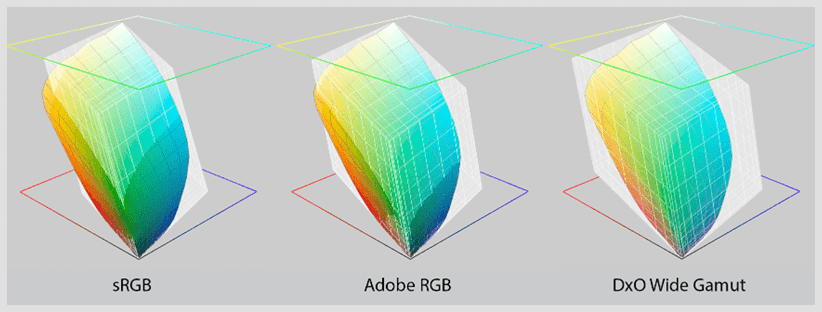
Here, the gamut of a photo printer is shown in color while the gray overlay shows the size of sRGB, Adobe RGB, and DxO Wide Gamut. Note how in the sRGB and Adobe RGB spaces, some colors are out of gamut and can’t be printed.
A wider gamut means
more natural color
DxO Wide Gamut also lets you extract more from your RAW files. Camera sensors don’t have an inherent color space — they simply capture raw data. To view or edit that data, it must be interpreted within a defined color space. In other words, RAW files themselves have no color space, but the JPEGs or TIFFs created from them do.
Working within a color space with a wider gamut means preserving a greater range of the colors originally recorded by the camera’s sensor. By contrast, converting to smaller gamuts such as sRGB or Adobe RGB can cause some of those colors to be clipped or lost.
DxO Wide Gamut provides more flexibility when adjusting color. For instance, DxO PhotoLab’s ClearView Plus tool can generate hues that fall outside the Adobe RGB gamut — but with DxO Wide Gamut, these colors are maintained accurately, ensuring full fidelity and richer results.

How DxO Wide Gamut
provides truer color
In digital photography, images typically pass through three stages on their journey from sensor to screen. The sensor-native color (raw data) is first converted into a working color space — the unseen environment used for editing — and then into an output color space, which determines what we actually see on screen. At any point in this process, colors can fall out of gamut if they’re not handled carefully.
When colors fall outside a gamut, they must be remapped to fit within it. This is usually done by clamping out-of-gamut colors to the nearest possible value that can be displayed.
For example, in an 8-bit RGB image, the most saturated red has a value of 255/0/0. Any value beyond 255 would need to be clamped back to that limit — the maximum the display can show. Many color management systems rely on this approach, but it often leads to undesirable side effects: hues can shift, saturation can drop, and textures may lose their subtle contrast as surrounding colors fall out of gamut. The result is an image that looks less natural and less detailed.
With DxO Wide Gamut, sensor-native color is first converted to working color by analyzing and desaturating — only if necessary — the most saturated colors by a small amount. This produces images that contain all luminance details captured by the sensor, even if they are slightly lower intensity.
Therefore, with DxO Wide Gamut, all tonality and detail can be maintained when those colors are finally displayed as output colors after editing.
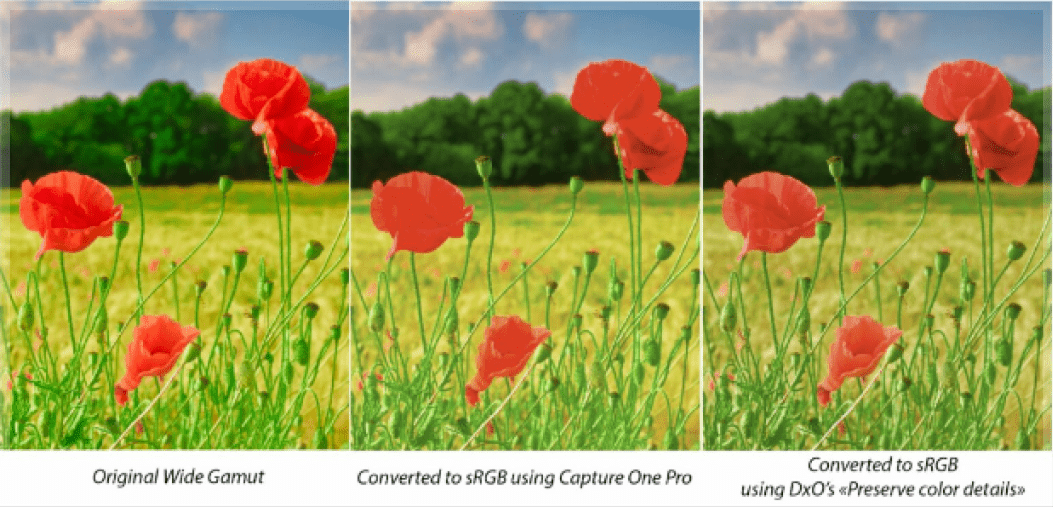
Comparison when converting to sRGB from original image
DxO Wide Gamut:
The intelligent compromise
We believe that DxO Wide Gamut provides the best possible trade-off between preserving as much color as needed and allowing DxO PhotoLab users to manipulate color in a way that feels natural and intuitive. With DxO Wide Gamut, photographers can reproduce any color they may encounter, as closely as possible to the original, without ever losing detail.
For a deep dive into color science and how DxO Wide Gamut works, be sure to read this white paper (English language only) from our Head of Science.


For the passionate photographer.